UDI · AIDC · HRI
UDI barcodes and labelling: from data fields to readable labels
A UDI barcode is more than a printed pattern: it combines device identification with the required production information in a machine-readable structure. Data content, issuing agency, data carrier and print quality must work together. This guide uses existing Europe IT illustrations to explain the connections for regulatory affairs, master-data owners and SAP and labelling teams.
Understand the data. Select the carrier. Check the label.
01 · Which information belongs where?
| Term | Role |
|---|---|
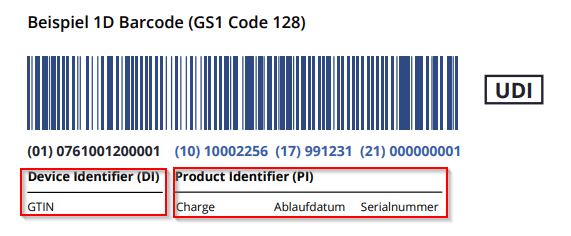
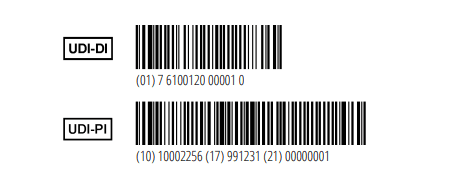
| UDI-DI | Identifies the manufacturer/labeler and device model or version. In GS1 this is the GTIN; the actual identifier follows the selected issuing agency. |
| UDI-PI | Contains applicable production information, such as batch, serial number, manufacturing or expiry date. PI means Production Identifier. |
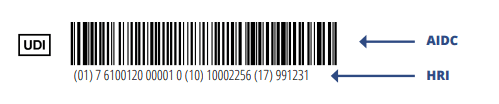
| AIDC / HRI | AIDC is the machine-readable representation; HRI is the human-readable interpretation. General product text and symbols are not automatically part of the HRI. |
| Basic UDI-DI | An EU grouping identifier used in documentation and the database. Do not confuse it with the UDI-DI on a device; it is not printed as the UDI carrier on the label. |
UDI-DI alone does not mean that every individual unit has its own serial number. The required UDI-PIs depend on the device and applicable requirements.
FDA: UDI Basics · European Commission: UDI & issuing entities
02 · A readable code is not necessarily a suitable UDI code
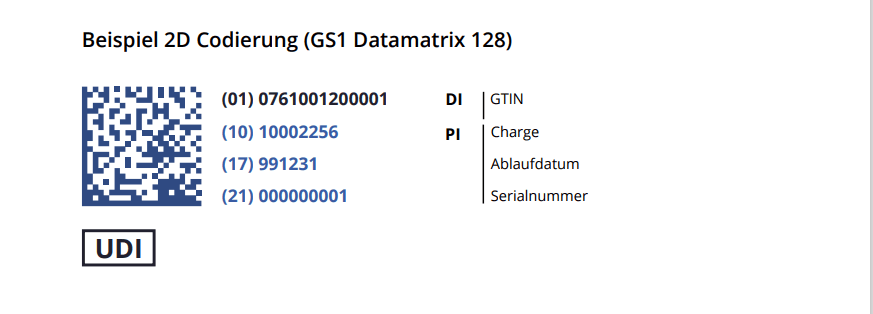
GS1 DataMatrix and GS1-128 combine defined data syntax with a suitable symbol. Arbitrary Data Matrix or Code 128 content is not automatically a GS1 UDI. For GS1 healthcare product identification, a QR code is not an equivalent substitute; an additional information link serves a different purpose.
GS1: 2D barcodes in healthcare · GS1: DataMatrix Guideline
Select the issuing agency before encoding
GS1, HIBCC and ICCBBA have their own identification and data rules. The EU also designates IFA. HIBC data must follow the HIBC Supplier Labeling Standard; ICCBBA uses ISBT 128 for its applicable scope. Recognition of the agency in the target market must be assessed separately.
European Commission: UDI & issuing entities · HIBCC: UDI & Labeling Resource Center · ICCBBA: ISBT 128 / UDI
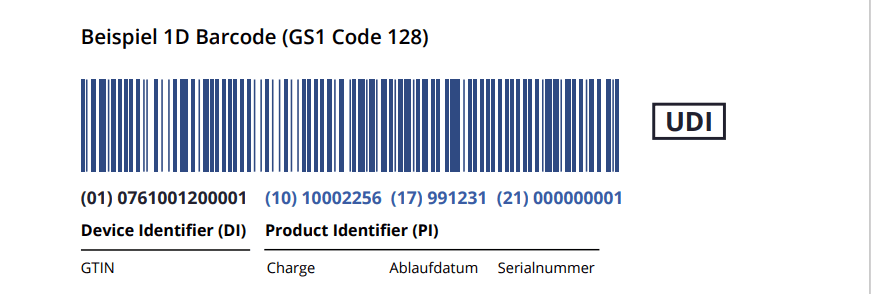
GS1 example: data fields, not a copied sample identifier
| Application Identifier | Meaning | Check |
|---|---|---|
| (01) | GTIN / UDI-DI | Correct device and packaging level? |
| (10) | Batch / lot | Correct value and variable field length? |
| (17) | Expiry date | Required date format followed? |
| (21) | Serial number | Correct individual device assignment? |
Parentheses are used here to display GS1 Application Identifiers in human-readable form. Actual encoding, FNC1/separators and permitted formats follow GS1 rules. This table does not generate a verifiable barcode.
03 · A complete label contains more than UDI
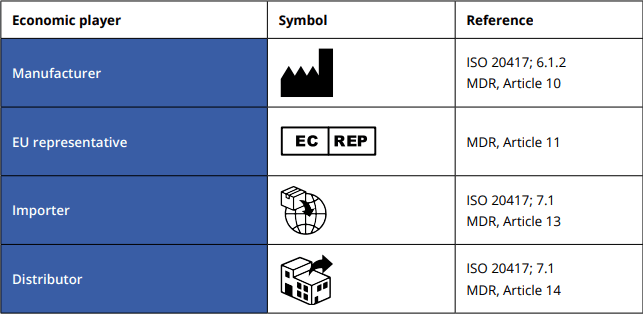
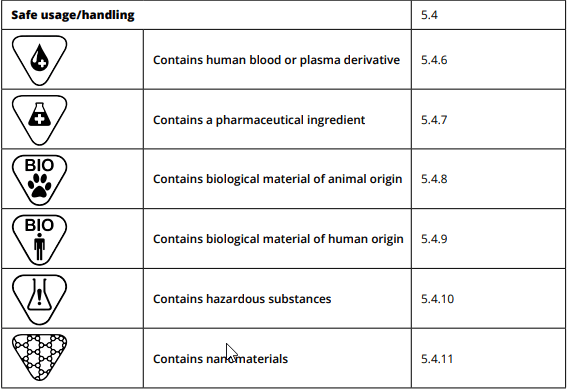
Depending on the device, manufacturer details, product name, warnings, storage conditions, sterility information and other elements belong on the label or in accompanying information. Not every element applies to every device. Standardised symbols are not barcodes; their meaning must not be confused with automatic data capture.
Recognised symbols can save space and support multilingual labelling, but do not replace every textual requirement. An origin statement such as “Made in CC” is only a generic example using a country code, not universally prescribed MDR wording.
Standards update: ISO 15223-1:2021 with Amendment 1:2025 addresses symbols. ISO 20417:2026 is the new second edition covering manufacturer information. ISO publication alone does not determine which edition applies or is harmonised in a particular regulatory context.
ISO 15223-1:2021 / Amd 1:2025 · ISO 20417:2026

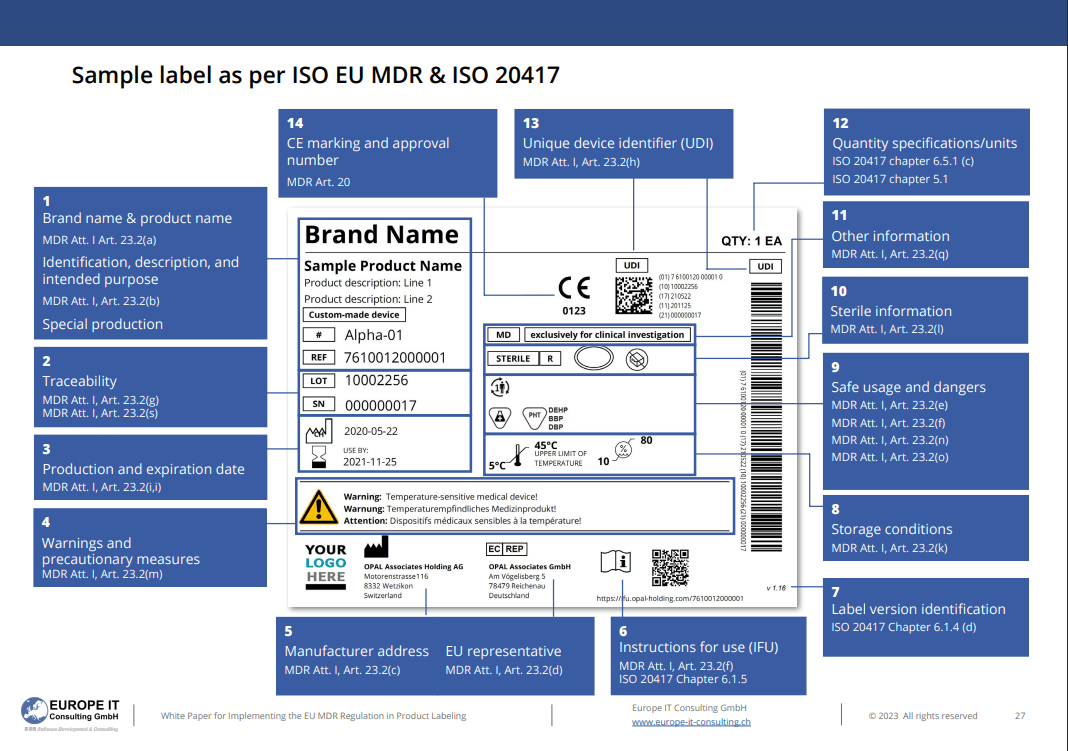
Historical label example — with clear limitations
The existing illustration shows where possible label elements may appear, not a universally approved label. It combines different scenarios and includes older references. Custom-made, clinical-investigation, CE-marking and device-specific warning information must not be copied together without review. A participating notified body’s number is not a general “approval number”.
04 · Checks before production printing
- Define target market, device type, packaging level and any direct-marking requirement.
- Map approved master data and variable production data to the correct fields.
- Check issuing-agency syntax, check digits, date formats and separators.
- Compare AIDC, HRI and visible device information.
- Verify printing on the actual material: contrast, dimensions, quiet zones and durability.
- Document changes and approvals; do not equate a successful scan with complete quality verification.
Bring UDI data and SAP printing together
Europe IT combines UDI expertise with SAP and printing processes. A label project must consider the data model, print template and output process together. GUDI supports UDI data management in SAP; technical printing and approval of the specific label remain separate tasks.
Check your knowledge: UDI barcodes and labels
The existing quiz remains embedded. It supports learning, not label approval; regulatory decisions require current sources and assessment of the actual device.
The existing quiz content has not been technically or substantively revised.
Frequently asked questions
Can any QR code serve as a UDI?
No. The recognised issuing agency and target-market rules determine suitability. GS1 healthcare product-identification guidance should not be confused with QR codes for supplementary web information.
Is a successfully scanned barcode already compliant?
No. A scan alone does not verify complete syntax or all data, print-quality and labelling requirements.
Do all production values belong in GUDID?
No. GUDID contains identification and device attributes, not the actual batch or serial number of every individual device.
Is this example a finished label for my device?
No. The existing sample is explicitly marked as a historical illustration. Applicable information and rules must be assessed for the specific device.